Repository navigation
Library not loaded libgmp.10.dylib on self-hosted macos M1 #341
Description

using: self-hosted macOS (M1 chip)
- name: Install ruby
  uses: ruby/setup-ruby@v1
  env:
    ImageOS: macos1015
1st libgmp.10.dylib error:
The installation failed on "Print Ruby version" step with the error below:
Reason: tried: '/usr/local/opt/gmp/lib/libgmp.10.dylib' (no such file), '/usr/local/lib/libgmp.10.dylib' (no such file), '/usr/lib/libgmp.10.dylib' (no such file)
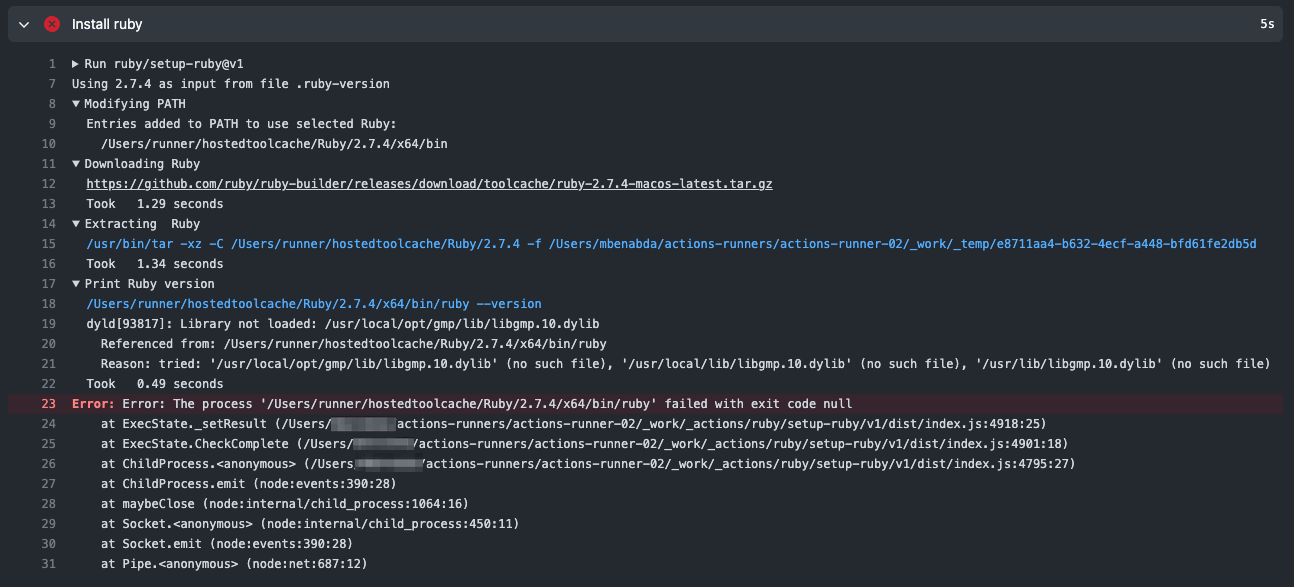
I have gmp installed with homebrew and hence the libgmp.10.dylib is located under /opt/homebrew/Cellar/gmp/6.2.1_1/lib/libgmp.10.dylib
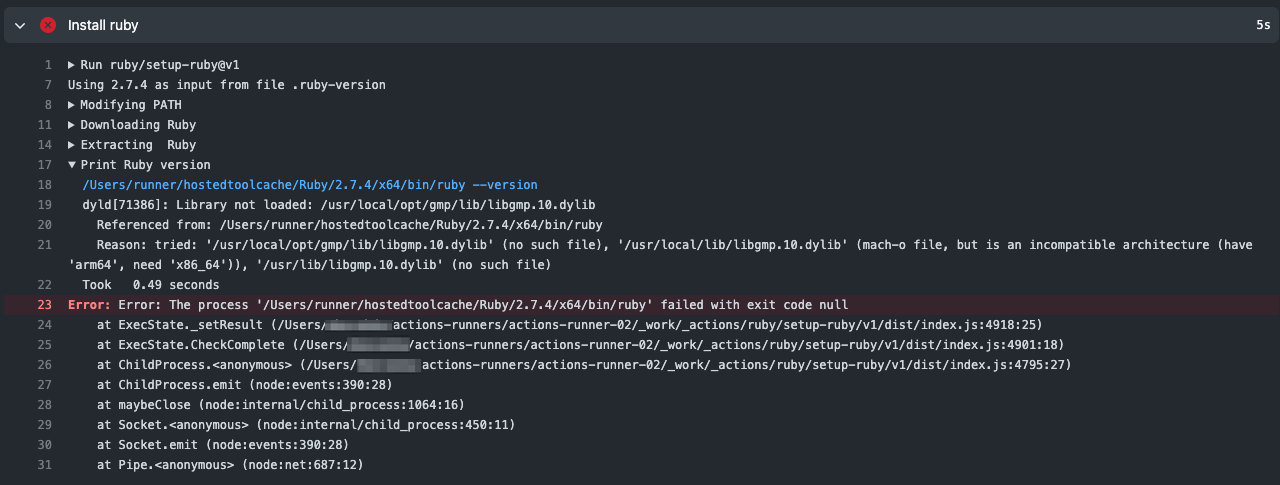
2nd libgmp.10.dylib error
I manually installed gmp to ensure /usr/local/lib/libgmp.10.dylib will be available
but then, got a new error:
'/usr/local/lib/libgmp.10.dylib' (mach-o file, but is an incompatible architecture (have 'arm64', need 'x86_64')),
Activity
arelstone commentedon May 19, 2022
I am facing the same issue.
I want to be able to make an internal release of our ios app when merging to the develop branch. We've acquired a MacMini M1 (2020) that I will be using as a self hosted runner.
I've created a user
runnerwhich has admin rights.rvmis installed and the correct version ofruby (2.7.4)has been installed too.The runner is working and I can see that it picks up the jobs as it should.
The workflow:
Output from workflow:
eregon commentedon May 23, 2022
Short answer: this action and the the built Rubies do not support any other architecture than x86_64.
We should probably update it to error early in that case.
It might still work on M1 if Rosetta 2 is installed though, but then you need to make sure the exact same dependencies are installed as on GitHub action, and specifically here a x86_64
/usr/local/opt/gmp/lib/libgmp.10.dylib.m2hd1 commentedon May 24, 2022
bummer, thanks @eregon
any plan to support M1 in the near future ?
eregon commentedon May 26, 2022
We'd need M1 GitHub-hosted runners for that, so I can build the releases.
Until then, no, but it might work if installing Rosetta 2 and the needed dependencies with amd64 Homebrew.
I might consider adding a way to build your own ruby and use it with setup-ruby, but that seems a separate issue somewhat.
According to https://tenderlovemaking.com/2022/01/07/homebrew-rosetta-and-ruby.html,
/usr/localshould be amd64 Homebrew, and so/usr/local/lib/libgmp.10.dylibshould be amd64 but it seems aarch64 in your case.So I guess you manually copied
/opt/homebrew/Cellar/gmp/6.2.1_1/lib/libgmp.10.dylibto/usr/local/lib/libgmp.10.dylib, which is pretty wrong, do not mix architectures like that please.To run under Rosetta you should install amd64 Homebrew (as explained in the blog post) and install gmp in amd64 Homebrew.
m2hd1 commentedon May 26, 2022
@eregon thanks for the reply and the workaround !
oh I see, bummer it can't be built from the runners you have :(
no, I uninstalled the homebrew ruby and then built and installed ruby from the source
probably I can try building an x86/x64 build and see if that helps ...
kuhnroyal commentedon Jul 8, 2022
This is no exactly correct. There are 3 different homebrew folders:
/usr/local/opt- x86 on x86 devices/usr/local/homebrew/opt- x86 on arm64 devices/opt/homebrew- arm65 on arm64 devicesAnyways, I now have the action working on M1.
You can follow https://medium.com/mkdir-awesome/how-to-install-x86-64-homebrew-packages-on-apple-m1-macbook-54ba295230f to install brew for x86 and enable Rosetta.
Afterwards use the new brew to install the required packages
arch -x86_64 /usr/local/homebrew/bin/brew install gmp libyaml rvm(or use your alias).These are installed into
/usr/local/homebrew/opt. But this folder is not checked when ruby is looking for the libraries.So just create a symbolic link
sudo ln -s /usr/local/homebrew/opt /usr/local/optand you are done.rgaufman commentedon Aug 7, 2022
I already have ruby working on M1, I do not have rosetta and trying to avoid it as specs run much slower. Any solution to this? - I like the idea of being able to just use my existing working ruby.
eregon commentedon Aug 7, 2022
@rgaufman This needs better docs, but this should already work if you build your own ruby in the hosted tool cache and create the "complete" file:
setup-ruby/common.js
Lines 165 to 186 in 6148f40
That's the overall approach of GitHub Actions for self-hosted runners and the hosted tool cache.
rgaufman commentedon Aug 10, 2022
@eregon Ah, interesting, so if I for example just create a symlink to the ruby and bundle binaries in /Users/runner/hostedtoolcache/bin/ - that should just work?
eregon commentedon Aug 10, 2022
I'm not entirely sure a symlink is accepted (depends on https://github.com/actions/toolkit/tree/main/packages/tool-cache), but it's worth a try.
rgaufman commentedon Aug 15, 2022
I ended up just commenting out ruby-setup and adding the path to my ruby. Not a perfect solution but a good enough workaround as we standardise on a single Ruby version across the code bases, hope this is useful for someone:
Shahaed commentedon Sep 7, 2022
It won't. The tool checks the
.../actions-runner/_work/_tool/Ruby/{version}/{os_architecture}for existing cache and if it doesn't exist this action will download a new on into thehostedtoolcachefolder and overwrite whatever is there.Since Github Actions supports M1 self hosted runners it would be nice for this action to have the MacOS arm builds. However automating that is obviously hard since Github doesn't have any MacOS arm runners.
Shahaed commentedon Sep 7, 2022
For anyone that wants to keep using this action and also use the ARM build of Ruby here's a python script that you can run before each job (How to run script on self hosted runners).
It will link all homebrew installs to the tools cache. Script doesn't handle older version (i.e. Ruby@2.7) but can easily be modified to do that.
https://gist.github.com/Shahaed/a37c62bd89bf85c649fc0e72fd4d6d94
eregon commentedon Sep 7, 2022
I'm confused, it seems to work given it works with your script which does use symlinks, right?
magnussp commentedon Sep 9, 2022
@Shahaed in which dir are you expecting your script to be placed to work?
magnussp commentedon Sep 9, 2022
After some more headache with this problem I don't think @Shahaed python script will solve the issue for me. I already have an arm64 built binary of Ruby installed on the machine via
rbenv. The python script only seem to care about homebrew installs.So my solution was to create a symlinks in
/Users/runner/hostedtoolcacheto therbenvinstall of Ruby similar to how @Shahaed python script does for homebrew installed Cellars.Then I have a script that is run before runner jobs that will execute
ln -fs /Users/runner/hostedtoolcache/Ruby /Users/runner/actions-runner/_work/_toolSo in short
This can be a temporary solution for those with
rbenvruby until this action,setup-ruby, have solved arm64 macos builds that are pulled down by the action.Shahaed commentedon Sep 21, 2022
Yup @magnussp, I did the bare minimum to make the actions run on the mac mini and installed all dependencies with Brew. Since we're only doing iOS development having multiple version of Ruby with rbenv (etc) wasn't a big deal.
I like your solution of also filling the
hostedtoolcachefolder as well and then symlinking from there. Might help othersetup-xxxactions. Depends on how they're written I assume.akarabach commentedon Oct 3, 2022
Any updates on it ?
eregon commentedon Oct 3, 2022
Nothing we can do until GitHub has GitHub-hosted darwin-aarch64 runners.
eregon commentedon Mar 3, 2023
With #473 this action now gives instructions for how to make it work for self-hosted runners not matching a GitHub-hosted runner image.